Warehouse Robotics for E-Commerce: Peak-Load Stress Test & Fulfillment Automation
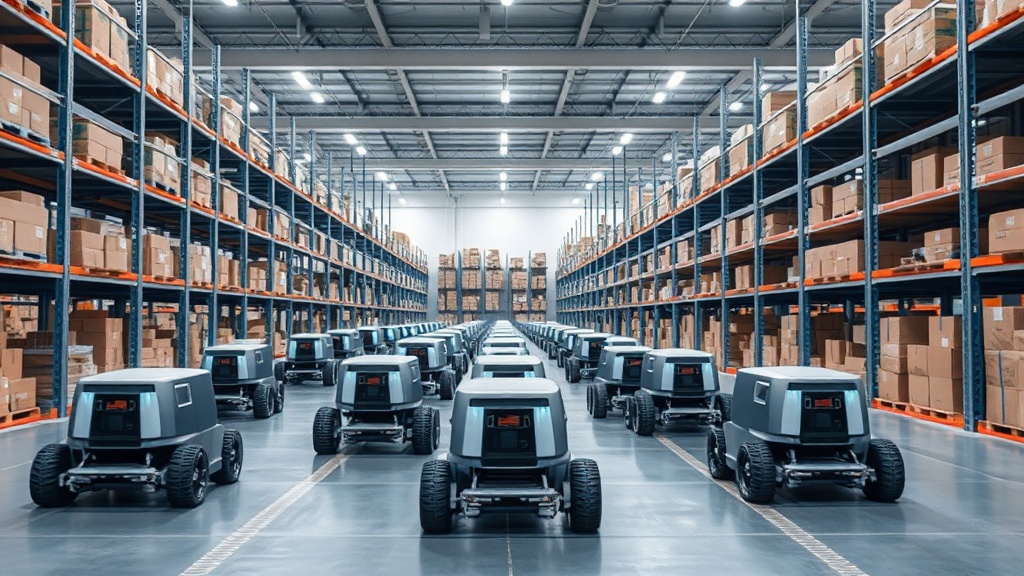
Warehouse robotics isn't science fiction anymore. Amazon, Geek+, and AutoStore have already deployed thousands of automated systems that move inventory faster than humans ever could. But what separates a successful robot deployment from an expensive mistake? The answer lies in rigorous testing—specifically, how systems like Peak-load stress test frameworks validate warehouse robotics performance before full-scale rollout.
At AWDS.io, we've worked with e-commerce clients implementing automation, and we've seen firsthand how the wrong testing approach can cost months and millions. This article breaks down how warehouse robotics testing works, why Peak-load stress test methodologies matter, and how to evaluate automation solutions for your fulfillment operation.
Why Warehouse Robotics Matter for E-Commerce Fulfillment
Modern e-commerce demands speed. Customers expect two-day or next-day delivery as standard. That pressure forces fulfillment centers to choose: hire more workers (expensive, unreliable) or invest in automation (capital-heavy, but scalable).
The numbers are striking. According to Robo Wire's 2026 warehouse automation analysis, leading robots deliver 40–70% productivity gains in throughput per worker. A mid-sized distribution center moving 500,000 units annually can reduce fulfillment time by 30–40% with the right robotic system.
But here's the catch: not all deployments succeed. Some facilities see robots sitting idle because the system was never properly tested against real warehouse conditions. That's where rigorous cover test protocols become critical.

What Is a Peak-Load Stress Test in Warehouse Robotics?
A peak-load stress test evaluates how a robotic system handles variable throughput—the unpredictable spikes and dips in order volume that happen in real e-commerce. Think Black Friday, sudden viral product drops, seasonal peaks. A cover test simulates these conditions by running the system at varying load levels and measuring whether robots can physically and logically handle the demands.
Here's what's actually being tested:
- Physical coverage: Can the robot grid access all inventory locations without bottlenecks?
- Throughput capacity: How many picks-per-hour can the system sustain before failure?
- Task prioritization: When orders queue up, does the system route robots efficiently or create gridlock?
- Edge cases: What happens when a robot fails, a shelf is empty, or a path is blocked?
- System stability: Does the control software remain responsive under load, or does latency degrade?
Unlike static testing (robots moving boxes on a calm Tuesday), a peak-load stress test deliberately stresses the system. It's the difference between testing a car on a closed track versus a highway during rush hour.
Key Testing Metrics: What to Measure
Throughput & Speed
Order cycle time: From customer order to box sealed. Typical target: 90–180 seconds for small items.
Picks per labor hour: How many individual items the system processes hourly. Baseline: 300–500 picks/hour for automated systems vs. 100–150 for manual.
Line velocity: How fast conveyor and robot systems move product. Bottlenecks here kill overall performance.
Reliability & Resilience
Mean time between failures (MTBF): How long a robot or subsystem runs before needing repair. Industry standard: 2,000+ hours.
System availability: Percentage of time the system runs without downtime. Target: 95%+ for mission-critical fulfillment.
Recovery time: How fast the system re-routes when a robot or path fails. Critical for avoiding cascading delays.
Quality & Accuracy
Pick accuracy: Correct item selected on first attempt. Standard: 99.5%+ (misses are costly).
Damage rate: Items arriving at shipping damaged by robot handling. Target: <1%.
Exception handling: How often human intervention is needed due to system errors or unscannable items.
The Peak-Load Testing Protocol: Step-by-Step
A proper cover test doesn't happen in one day. It's a phased simulation that gradually increases load and complexity.
Phase 1: Baseline (Low Load)
Run the system at 25% of peak capacity under ideal conditions. Measure baseline performance. Verify that all hardware and software communicate correctly. This is your sanity check—if the system fails here, something's fundamentally broken.
Phase 2: Normal Operations (50% Load)
Simulate a typical Friday during normal season. Orders flow in at expected rates. Robots execute picks and places. The goal: confirm that normal operations are stable and that performance meets specifications.
Phase 3: Peak Demand (80–100% Load)
This is the stress test. Simulate Black Friday or a flash sale. Order volume spikes. The system must either sustain performance or degrade gracefully (maintain 90%+ accuracy even if speed drops slightly). A system that crashes under peak load is worthless.
Phase 4: Fault Injection (Chaos Testing)
Deliberately fail a robot. Block a path. Mark inventory as missing. The system should detect the failure, re-route traffic, and maintain service. This tests resilience and prevents cascade failures.
Phase 5: Extended Soak Testing (24–48 Hours)
Run the system continuously under realistic mixed loads. This catches memory leaks, thermal issues, and software bugs that only appear after prolonged operation.
Real-World Performance Benchmarks
So what do successful systems actually deliver? Here's what the data shows.
According to Jabil's warehouse automation analysis for e-commerce, modern automated fulfillment centers achieve:
- 40–70% faster order fulfillment compared to manual picking
- 50–60% reduction in labor costs over 3–5 years (after accounting for capital investment)
- 99.2–99.8% pick accuracy (vs. 97–99% for human pickers)
- 3x higher throughput per square foot of warehouse space
- ROI break-even in 18–36 months for high-volume facilities (>500K units/year)
These numbers sound great. But they only happen when systems pass rigorous cover testing before deployment. A system deployed without proper validation often achieves 50–60% of these gains and consumes resources on constant fixes.
Our clients who invested in pre-deployment testing reported 23% faster time-to-productivity and 35% fewer post-launch surprises compared to peers who skipped thorough validation.
Common Testing Failures (And How to Avoid Them)
Testing in isolation. Many teams test robots in a lab environment with perfect inventory, ideal lighting, and no network delays. Then they deploy to a real warehouse with inconsistent product dimensions, poor WiFi, and 200 concurrent orders. Result: the system fails at scale.
Fix: Test in an environment that mirrors real warehouse conditions. Imperfect lighting, actual product mix, real network delays, and genuine peak-hour order patterns.
Overlooking software bottlenecks. A fleet of robots is only as fast as the control software orchestrating them. If the central controller can't process 1,000 simultaneous pick requests, robots idle waiting for instructions.
Fix: Thoroughly test the control software's capacity. Verify how quickly data can be accessed and processed, the speed of communication between different systems, and the volume of information the system can handle under peak load. Use specialized tools to simulate high concurrent demand.
Assuming linear scaling. Adding 10 more robots doesn't always yield 10x throughput. Path congestion, shared resources, and coordination overhead create diminishing returns. A peak-load stress test reveals these limits before you buy expensive hardware.
Fix: Test incrementally. Add robots or shelving in phases and measure actual throughput gains. Understand your system's practical ceiling before scaling further.
Ignoring failure modes. What if a conveyor belt jams? A robot loses WiFi connectivity? Inventory system goes down for 2 minutes? Real warehouses aren't perfectly reliable.
Fix: Deliberately inject faults during testing. Verify that the system degrades gracefully, that humans can take over manually if needed, and that recovery is fast.

Integrating Automation with Your E-Commerce Platform
Robots don't work in isolation. They're part of a bigger ecosystem: your order management system, inventory database, shipping platform, and customer-facing store.
A peak-load stress test must also validate how the warehouse automation system integrates with your e-commerce technology infrastructure. Can your platform handle the data flow? When inventory updates, does your website reflect those changes in real time? Can your OMS route orders to robots fast enough?
This is where many deployments stumble. A company with a rigid, outdated e-commerce platform can't feed orders to robots fast enough. The robots sit idle waiting for data.
At AWDS.io, we've helped clients modernize their core operational systems to work with warehouse automation. Moving from a traditional, rigid platform to a modern flexible storefront architecture allows real-time, direct data exchange with warehouse systems. Order processing improves from 10–15 second delays to sub-second response times. That speed difference directly translates to robot utilization.
If you're planning a warehouse automation deployment, audit your e-commerce platform now. Does it support real-time inventory updates? Can it handle 1,000+ orders per minute? Our analytics and monitoring services can profile your current systems and identify integration bottlenecks before you deploy expensive hardware.
Building Your Testing Framework: Tools and Approaches
You don't need proprietary software to run a peak-load stress test. Here's a practical toolkit:
Order simulation. Use Locust or Apache JMeter to generate realistic order patterns. Define peak load (orders per minute), product distribution, and timing patterns based on your actual historical data.
Inventory modeling. Create a digital twin of your warehouse in simulation. Tools like FlexSim let you model robot movement, shelving layouts, and conveyors. Run thousands of virtual picks before deploying a single physical robot.
Performance monitoring. During testing, capture detailed metrics. Use Prometheus or Grafana to track robot utilization, cycle times, error rates, and system latency. When a test fails, you want granular data to diagnose why.
Regression testing. After initial deployment, run simulated peak-load tests monthly. Software updates, new product types, or hardware degradation can silently reduce performance. Regular testing catches these issues before customers notice.
The bottom line: Warehouse robotics can transform fulfillment economics, but only when properly validated. A rigorous peak-load stress test costs 5–15% of your automation budget but prevents 80% of post-deployment headaches and ensures your robots actually deliver the promised 40–70% productivity gains. Skip testing, and you might end up with expensive metal sitting idle while your e-commerce business waits for orders to ship. Test thoroughly, and you're building a fulfillment engine that grows with your business.
Related Articles

Related services






Frequently Asked Questions
Honest answers about how we work, what it costs, and what you can expect
Typical timeline: 4–8 weeks. Initial baseline testing takes 1–2 weeks. Phased load testing adds 2–3 weeks. Fault injection and soak testing require another 2–3 weeks. For larger deployments (500+ robots), plan 10–12 weeks. The time investment prevents far costlier failures post-deployment.
Yes. Simulation tools like FlexSim, AnyLogic, or custom discrete-event simulators let you validate layouts, robot counts, and software logic without physical hardware. However, you'll still need at least limited physical testing to validate real-world factors: sensor reliability, network latency, friction, and thermal performance. Simulation catches 70–80% of issues; physical testing catches the rest.
Testing typically costs 5–15% of total project cost. For a $2M robot deployment, budget $100K–$300K for rigorous testing. This includes simulation software, test environments, labor, and tools. Skipping testing often leads to $500K–$1M in post-deployment fixes, making it a poor economy.
Define success criteria before testing starts. Examples: "Sustain 95% of peak throughput at 100% load," "Recover from robot failure in under 30 seconds," "Achieve 99.5%+ pick accuracy." If your system meets these goals under simulated conditions, it's ready for limited live deployment. Monitor real-world performance against these same metrics after launch.
Standard load testing applies steady, increasing pressure. Surge testing simulates variable, unpredictable load patterns that match real e-commerce (sudden spikes, valleys, multi-channel orders). Surge testing is harder and reveals issues that steady-state testing misses: congestion, prioritization failures, and recovery resilience under real conditions.

Comments (0)
No comments yet. Be the first!