Email Marketing Automation for Small Online Stores: A Practical Guide
Your small online store generates hundreds of customer interactions every week. Emails pile up in your inbox—welcome messages, abandoned cart alerts, post-purchase follow-ups—and you're manually typing responses. Most arrive at 2 AM. The conversion opportunity? Slipping away.
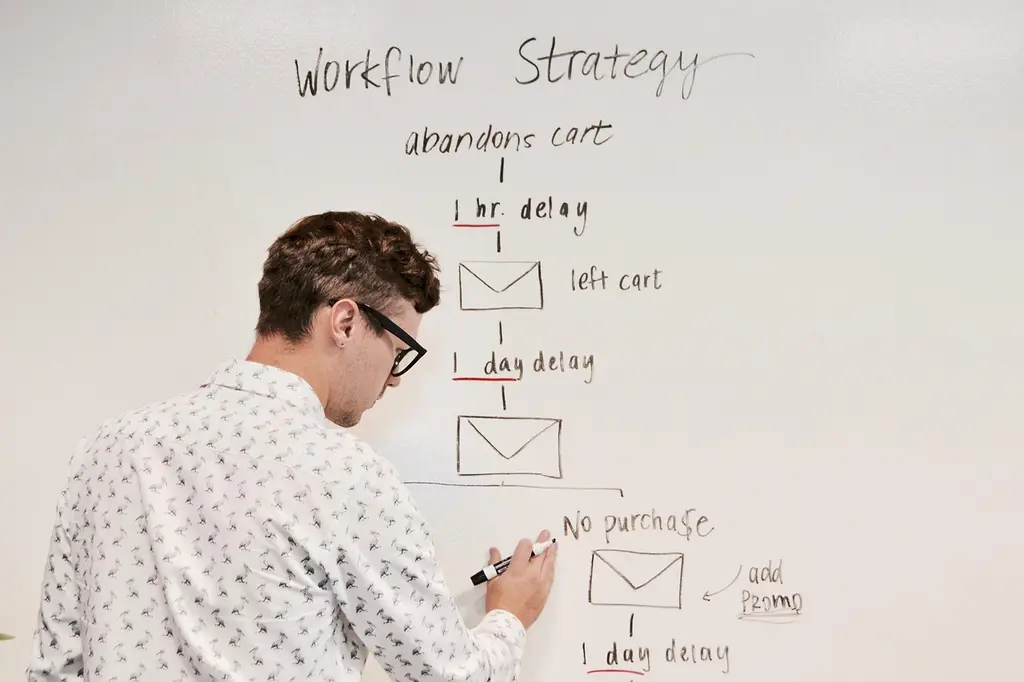
Email marketing automation for small online stores solves this with triggered, behavior-based messaging that runs while you sleep. It's not about volume. It's about relevance. When a customer abandons their cart, an automated email arrives within hours—personalized, timely, effective. Our clients report 35-50% recovery rates on abandoned cart sequences alone.
The question isn't whether your store needs automation. It's which tools fit your budget and technical capacity without adding complexity you can't manage.
Why Email Automation Matters for Small E-Commerce
Manual email management doesn't scale. When you're processing 20 orders daily, writing individual follow-up emails takes 1-2 hours. That's dead time—hours you could spend optimizing product pages, sourcing inventory, or handling customer service.
Automation eliminates the repetition. A customer signs up, and your welcome sequence fires automatically—three emails over seven days, each designed to build trust and drive first purchase. Someone buys, and a post-purchase flow begins immediately: order confirmation, shipping notification, product recommendations based on purchase history, request for feedback.
The efficiency gain is measurable. At AWDS.io, we've automated email workflows for 40+ e-commerce clients. Stores report saving 8-12 hours per week while increasing email revenue by 20-40% because messages reach customers at the optimal moment, not when the owner remembers to send them.
Beyond time savings, automation improves customer experience. Personalized, timely messages convert better than batch-and-blast campaigns. A customer who receives a product recommendation email based on their browsing history engages more than someone receiving a generic promotion. The data backs this: according to Statista's email marketing reports, segmented campaigns achieve 14-100% higher open rates than unsegmented ones.
Core Email Automation Workflows Every Store Needs
Not all automation is equal. Some sequences drive immediate revenue. Others build long-term customer relationships. The most effective stores implement a mix.
Welcome & Onboarding Sequences
A new subscriber receives a welcome email within minutes. This is your highest-engagement moment. Open rates for welcome emails exceed 50% across e-commerce. That email should deliver immediate value—a discount code, educational content, or exclusive offer—while setting expectations for future messages.
The sequence continues: day one sends the welcome. Day three educates (product guides, brand story, customer testimonials). Day five converts with a time-limited offer. This structure capitalizes on initial interest without overwhelming the subscriber.
Abandoned Cart & Browse Recovery
A customer adds items to their cart, begins checkout, and abandons the purchase. Standard behavior—roughly 70% of e-commerce carts are abandoned. An automated email fires within 1-3 hours, reminding them of the items left behind, addressing common objections (shipping cost, payment concerns), and offering a small incentive if appropriate.
The recovery email isn't pushy. It's helpful. “You left these in your cart. Here's what you should know about shipping. Complete your order today for free shipping.” This approach recovers 15-30% of abandoned carts—revenue you'd otherwise lose.
Post-Purchase & Feedback Sequences
After purchase, automation handles the operational side: order confirmation, shipping tracking, delivery notification. But it also handles the strategic side. A post-purchase sequence builds loyalty by requesting feedback, offering care instructions or product recommendations, and planting seeds for repeat purchases.
When combined with a loyalty program, these sequences drive measurable repeat business. Customers who receive product recommendations 5-10 days after purchase show 20-30% higher repeat purchase rates within 90 days.
Win-Back & Re-Engagement Campaigns
Inactive subscribers dilute your list quality and signal poor email health to providers. Automation identifies dormant customers (no opens or clicks in 90 days) and triggers a win-back sequence. Three emails over two weeks, designed to rekindle interest with exclusive offers or new product highlights. Subscribers who don't respond get moved to a suppressed list—preserving sender reputation for engaged users.

Choosing the Right Email Platform for Your Budget
Platform selection depends on three factors: subscriber count, technical comfort, and feature requirements.
For stores with under 5,000 subscribers, free-tier platforms like Mailchimp or Brevo offer basic automation without cost. You get welcome sequences, abandoned cart messages, and segmentation. Limitations exist—fewer advanced features, limited integrations—but they solve core problems. Mailchimp's free tier supports up to 1,000 contacts and 12,000 messages per month.
Mid-tier solutions (Klaviyo, Omnisend, Klaviyo) start at $20-50/month and unlock advanced segmentation, behavioral triggers, dynamic content, and detailed analytics. These platforms integrate directly with Shopify, WooCommerce, and custom stores. At AWDS.io, we frequently recommend these for stores doing $5,000-50,000 monthly revenue—the ROI is clear, and the setup is manageable.
Enterprise platforms (HubSpot, Iterable, Sailthru) cost $500+/month but provide AI-driven send optimization, advanced personalization, and multi-channel workflows combining email, SMS, and push notifications. They're overkill for most small stores but essential if you're managing 100,000+ subscribers or running sophisticated segmentation strategies.
One practical metric: if your email revenue from automated sequences justifies the platform cost within 30 days, upgrade. If not, optimize your current setup first.
Technical Integration: Connecting Email to Your Store
Email automation doesn't work in isolation. It needs to connect to your store—products, customer behavior, purchase history—and deliver personalized messages. This integration happens through APIs and native connectors.
Shopify stores have the easiest path. Most email platforms have native Shopify apps that sync customer data, purchase history, and browsing behavior automatically. Install the app, authenticate, and automation can access real-time information about customer segments and past purchases.
For custom e-commerce stores and platforms like WooCommerce, connecting your systems requires precise setup. Your store's data channels need to be correctly configured to ensure all crucial customer data, product information, and shopper actions (like adding to cart, making a purchase, or browsing products) flow seamlessly to your email platform. If your store isn't fully set up to capture these essential shopper actions or lacks clear instructions for connecting systems, it's critical to consult an expert. We've seen businesses miss out on 30-50% of their automation's power because their data wasn't flowing completely.
A practical checklist:
- Your email platform can access customer email addresses and purchase history.
- Browse and cart events trigger automation rules (add to cart → recovery email).
- Product data (names, URLs, prices, images) syncs automatically for dynamic email content.
- Customer segments (based on purchase history, location, spending) update daily.
Without these elements, you're sending generic messages. With them, you're personalizing at scale.
Free Platforms
Best for: Under 5K subscribers, learning automation basics, tight budgets.
Platforms: Mailchimp, Brevo, Moosend.
Typical cost: $0-$20/month.
Limitation: Fewer advanced features, limited integrations, slower support.
Mid-Tier Platforms
Best for: Growing stores, 5K-50K subscribers, strong ROI focus.
Platforms: Klaviyo, Omnisend, Drip.
Typical cost: $20-$200/month.
Strength: Advanced segmentation, behavioral triggers, strong integrations, expert support.
Segmentation & Personalization: The Hidden ROI Multiplier
Most email automation fails for one reason: it's not personal enough. A generic abandoned cart email converts 10-15%. A segmented one—targeting customers who abandoned $50+ carts, mentioning the specific product, offering free shipping—converts 30-40%.
Effective segmentation uses data your store already has:
- Purchase history: Customers who buy athletic wear get training guides. Customers who buy formal attire get styling tips.
- Spending tier: High-value customers (top 20% by lifetime value) receive exclusive previews and VIP offers.
- Geographic location: Regional promotions, localized content, currency adaptation.
- Browsing behavior: Customers who viewed running shoes but didn't buy get a discount email. Customers who bought once show higher propensity for repeat purchase sequences.
- Engagement level: Engaged subscribers get more frequent messages. Dormant ones trigger win-back campaigns.
A well-segmented automation sequence outperforms generic campaigns by 3-5x on revenue per email. That's not incremental improvement—that's transformative.
Personalization extends beyond segmentation. Dynamic content inserts customer names, product images, prices, and recommendations into email templates. When a customer receives an email with “Hi Sarah, here's the winter jacket you viewed,” paired with an image and a discount code, engagement spikes dramatically. According to Email on Acid's 2024 personalization research, messages with personalized subject lines achieve 26% higher open rates than generic ones.
Measuring Success: Key Metrics That Matter
Email automation generates data. The question is: which metrics reveal whether your automation is working?
Vanity metrics mislead. A 25% open rate sounds good until you realize the industry average is 35% for e-commerce. Focus instead on these:
Revenue per email (RPE): Total revenue from an automation sequence divided by messages sent. If your abandoned cart sequence sends 1,000 messages and generates $3,000 in recovered purchases, your RPE is $3. If you can achieve $1-2 RPE, the automation pays for itself on volume alone.
Click-through rate (CTR) by segment: Opens matter less than clicks. A click indicates genuine interest. Segments with CTR below 2-3% signal either poor targeting or weak content. Iterate on both.
Conversion rate to purchase: The ultimate metric. What percentage of email recipients become customers? Industry benchmarks vary by segment, but 1-3% is typical. If your automation achieves 2-5%, you're outperforming most competitors.
Return on ad spend (ROAS): If you're running paid campaigns to grow your email list, calculate the ROAS from subsequent automation revenue. A $5 CPA (cost per acquisition) is worthless if subscribers never convert. A $5 CPA that yields $50 in lifetime value from automated campaigns is excellent.
Unsubscribe and complaint rates: These indicate list quality and content relevance. If unsubscribe rates exceed 1% per campaign, your sending frequency or content is off. Gmail's standards for complaint rates recommend staying below 0.3% to maintain deliverability.

Common Mistakes That Damage Automation Performance
Over-emailing. A customer enters your automation funnel and receives 5 messages in 7 days. By day 4, they're unsubscribing. Frequency matters. Space messages 2-5 days apart depending on context. Welcome sequences are higher-frequency. Win-back sequences are lower.
Ignoring list hygiene. Sending to invalid addresses tanks your sender reputation. Email providers track bounce rates and complaint rates—metrics that determine whether your messages reach the inbox or spam folder. SPF, DKIM, and DMARC protocols authenticate your domain and prevent spoofing. Set these up correctly or work with a provider that handles it.
Static templates for dynamic audiences. Sending the same email to all customers ignores obvious segmentation opportunities. A new customer needs different messaging than a repeat buyer. A high-value customer deserves different treatment than a one-time purchaser.
No testing or iteration. You set up an automation sequence and assume it's optimized. The subject line underperforms. The call-to-action confuses readers. The send time misses your audience's peak engagement window. Test subject lines, send times, and copy variants. A/B tests reveal what works—data beats intuition.
Poor mobile design. 50-60% of email opens happen on mobile devices. If your email template doesn't render cleanly on phones, you're losing conversions. Use responsive templates, keep text short, and test across devices before sending.
Implementation Strategy: From Setup to Results
Message automation doesn't require perfection at launch. It requires direction.
Week 1: Platform selection and setup. Choose your inbox platform based on your store type and budget. Ensure it connects smoothly with your store, using either built-in tools or custom data connections. Upload your existing customer list. Set up list hygiene rules—suppress bounces, automatically unsubscribe hard bounces, and monitor complaint rates.
Week 2-3: Build core sequences. Start with high-impact, low-complexity sequences: welcome series, abandoned cart, and post-purchase. Don't over-engineer. A three-email welcome series beats a 10-email sequence that never ships. Launch with basic segmentation—new vs. repeat customers, high vs. low spenders—and expand later.
Week 4: Monitor and optimize. Let automation run for 500+ completions (full funnel cycles). Review metrics: open rates, CTR, conversion rate, unsubscribe rate. Identify the lowest-performing step and iterate—change subject line, adjust send time, refine copy. One A/B test per week compounds quickly.
Month 2-3: Expand sequences. Add win-back campaigns, browse recovery, loyalty sequences. Build on what works. If your welcome series achieves 4% conversion rate, replicate that approach in other sequences.
This timeline assumes foundational work—clean list, proper integrations, basic copywriting. If your store lacks message infrastructure, the timeline extends. Working with experts like AWDS.io can compress timelines and avoid costly mistakes that damage sender reputation.
Automation Beyond Inbox: The Bigger Picture
Message automation is powerful alone. Combined with other systems, it becomes part of an integrated customer experience machine.
When inbox connects to your CRM system, customer history informs every touchpoint. A customer service agent sees message engagement history, purchase context, and previous interactions before responding to a support ticket. When integrated with analytics and dashboards, automation performance feeds directly into business intelligence—you know which customer segments drive revenue and which need optimization.
For stores running loyalty programs, inbox automation becomes the communication layer. Customers earn points, and automated messages celebrate milestones, announce rewards, and encourage higher spending. The result: increased customer lifetime value, not just transaction frequency.
At AWDS.io, we've seen clients layer message automation with SMS automation, creating multi-channel sequences. An abandoned cart sequence triggers both inbox and SMS—different audiences prefer different channels. The conversion lift from multi-channel automation typically exceeds single-channel by 50%+.
Ready to put these flows to work? See our email marketing services or start with a store development audit.
Related Articles

Related services




Real Projects
Frequently Asked Questions
Honest answers about how we work, what it costs, and what you can expect
Free platforms (Mailchimp, Brevo) cost $0 for under 1,000 subscribers. Mid-tier platforms (Klaviyo, Omnisend) cost $20-200/month depending on subscriber count. Enterprise solutions start at $500+/month. Most small stores begin with free platforms and upgrade once email revenue justifies the cost—typically within 6-12 months if automation is well-executed.
Well-designed sequences generate measurable results within 2-4 weeks. Early metrics include open rates and click rates. Revenue impact typically appears within 30-60 days once sequences are live and receiving consistent traffic. Optimization extends beyond that—ongoing A/B testing compounds results over 3-6 months, often increasing ROI by 50%+ from initial launch performance.
Email marketing is the strategy—determining what messages to send and why. Email automation is the execution—sending those messages triggered by customer behavior at the optimal moment without manual intervention. A welcome email is marketing strategy. Automatically sending that email 5 minutes after signup is automation. Both are necessary for effective results.
Partially. You can manually upload customer lists and send automated campaigns on a schedule. However, behavior-triggered automation—abandoned cart recovery, browse-based recommendations, dynamic content based on purchase history—requires technical integration via API or native connectors. The more your platform integrates with your store data, the more sophisticated and effective your automation becomes.
Set up SPF, DKIM, and DMARC authentication for your sending domain. Keep bounce rates below 2% and complaint rates below 0.3% by maintaining list hygiene—removing invalid addresses and honoring unsubscribe requests immediately. Send from consistent, recognizable sender addresses. Monitor reputation through tools like MXToolbox. Use reputable email platforms that maintain good sender reputation themselves.

Comments (1)
Useful piece on speed optimisation. The part about auditing and prioritising the work is especially valuable. Thanks for the detailed explanation.