What competitors sell and you don't — your site finds it and drafts the product
Competitors launch new services all the time, and checking their websites by hand is a job nobody keeps up with. The result: a client asks for something you could do, finds it on a competitor's site and never asks you.
Here the site does the comparison itself. Everything collected from competitors is measured against your live catalogue on both language versions. What you don't cover becomes a candidate — with search demand, the competitor's weak spot and a button that starts a product draft.

For companies whose catalogue should keep up with the market
Agencies, studios, service businesses and stores with a growing range: anyone who loses clients not on price, but because a service simply isn't on the site.
Owner
Sees in one list what competitors already sell and you don't — sorted so that what several of them offer comes first.
Marketer
Gets the search demand behind each candidate and the competitor's weak spot — the argument for your own page.
Content manager
Starts a product draft with one button and lets the AI fill it in for both language versions; the draft stays switched off until a person checks it.
Every competitor offering is measured against your catalogue
The site takes everything the competitor scout recorded and checks how much of each offering's name your own products and service pages already cover. Covered at 50% or more — you have it. Below that — a candidate. The threshold is a setting in the admin, measured on our own base.

Candidates with demand and the competitor's weak spot
Each row shows what the competitor calls the service, the closest thing you have and how much of it that covers, real search queries with their monthly volume, and what clients criticise the competitor for. Competitor names stay in the admin — they never reach your texts.
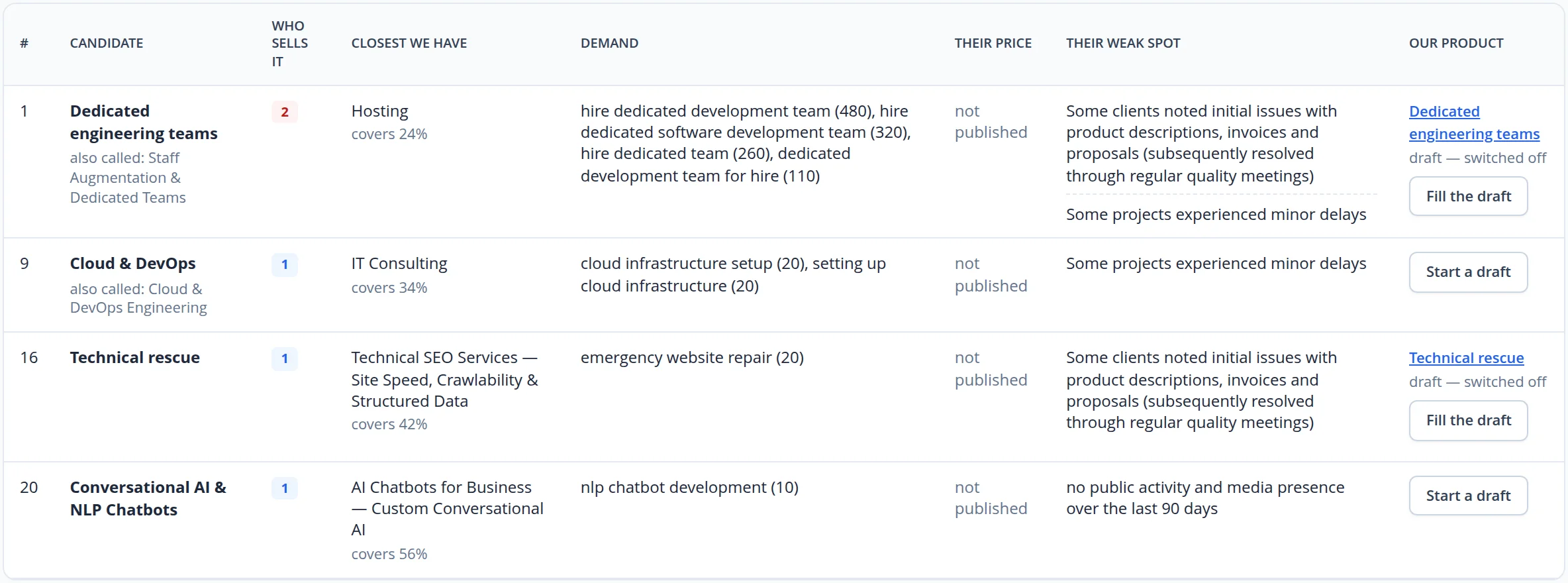
A draft that waits for a person
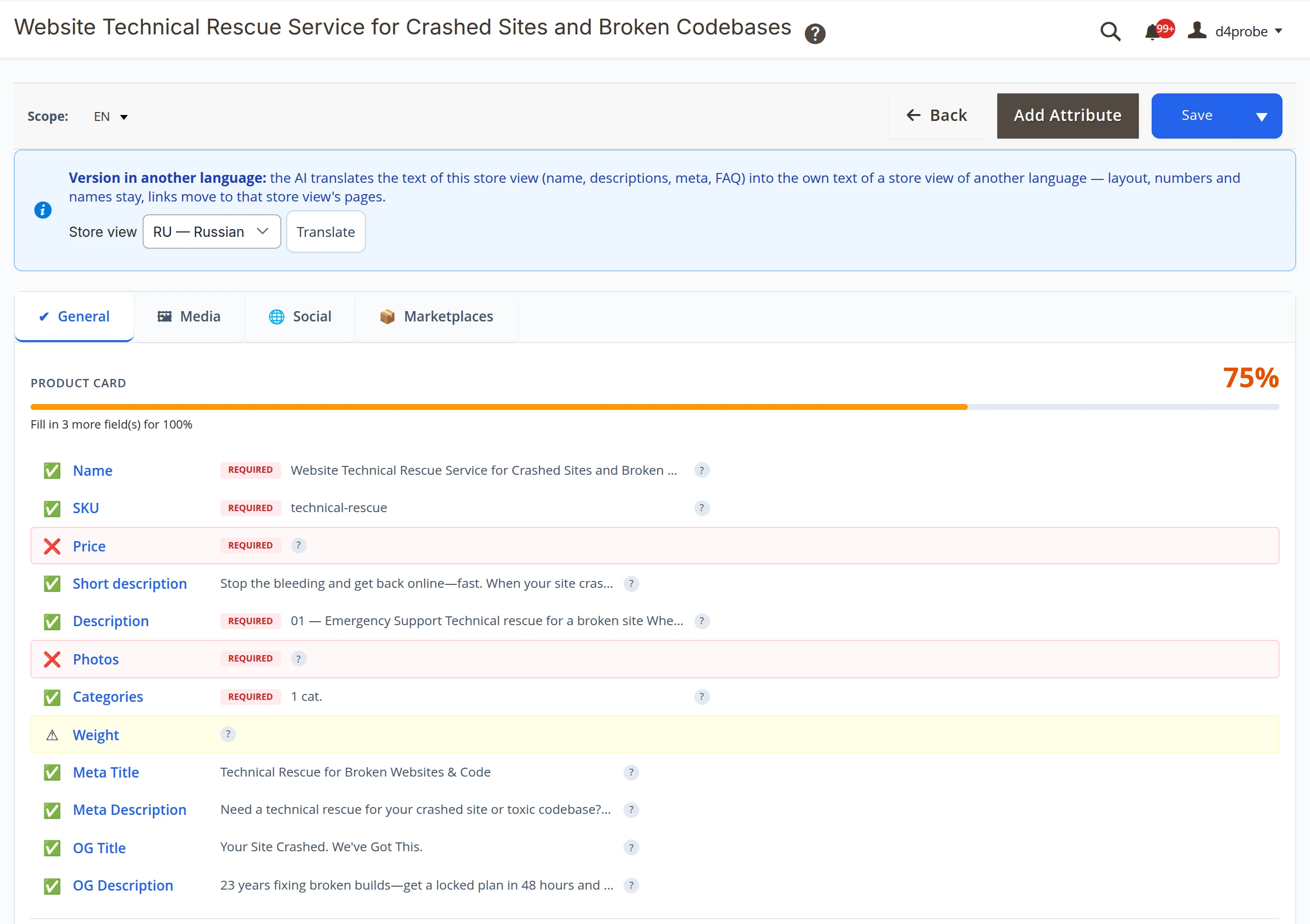
"Start a draft" creates a switched-off product in the category of the closest item; "Fill the draft" writes its card for both language versions — name, descriptions, search and social titles. The product card checklist shows what is still missing.
- The price is yours to set — the site never invents it, so the checklist marks it as missing
- Nothing goes live by itself — the draft stays switched off until you switch it on
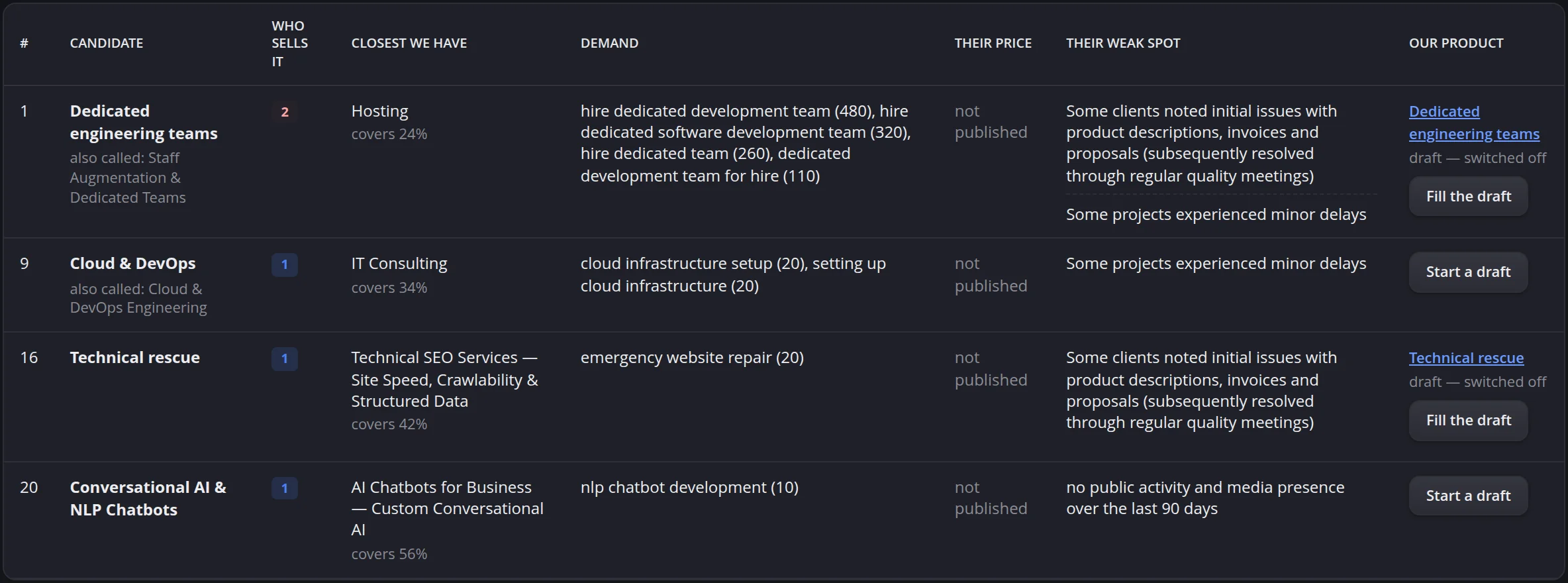
The same list in the admin's dark theme
While shooting this case we found that the page ignored the admin theme — it was dark even in the light one — and that the competitor's weak spot showed in Russian in the English admin although a translation was saved. Both are fixed: the page follows the admin theme, and the weak spot comes in the admin's language.
From your competitors to your first drafts
1. Competitors
We collect your real competitors and let the scout read their websites: what they sell, how they describe it, what clients say about them.
2. Comparison
The site measures their offerings against your catalogue and adds search demand. You see the candidates in the admin and can send the list to your work chat.
3. Drafts
You pick the candidates worth selling; the site drafts the products, you set the price and switch them on.
What we checked with our own hands
All frames come from our own site's admin on real data: offerings our scout recorded on competitor websites and drafts the site created from them.
- 111 offerings of 11 competitors against 451 items of our catalogue on both language versions: 70 covered, 11 too generic to compare, 25 candidates
- Search volumes in the table are real monthly figures, saved with the date they were measured
- Frames in English and Russian, the table also in the dark theme; competitor names were removed from the frames, and nothing was saved during the shoot
Find out what your competitors sell and you don't
We will set up competitor research for your market and show you the first candidates — with demand and ready drafts.
