Forms without a captcha — and without junk leads
Overnight a bot leaves hundreds of sign-ups and requests from made-up addresses: the list is polluted, emails go nowhere, real enquiries get lost. A captcha scares real customers away. Here forms are checked quietly: a person just types and sends, and the junk is filtered out on its own.
Every decision goes into a journal — you see who was stopped and why.
When customers reach you through forms
Stores with a newsletter and reviews, services that take requests, blogs with comments — anywhere a form is open to everyone and junk costs money and time.
Requests and contacts
Your team handles real customers, not ads and empty addresses — replies do not get lost in spam.
Newsletter and mailings
Only live addresses in the list: mailings do not go to mailboxes that do not exist, and land in spam less often.
Registration and reviews
Bots do not open fake accounts or flood products with reviews — your store’s reputation stays yours.
A field, a button — that’s it
No “select all the traffic lights”, no “I’m not a robot” boxes. The form looks as usual; the checks run in the background while the person types.

What happens behind the scenes
- The form has a hidden field a person never sees — a bot fills it in and gives itself away.
- On the first touch of the form, the page gets a signed time stamp from the site.
- A submission without the stamp means nobody opened the page: it is a script, not a person.
- The page does not get heavier: the stamp is requested only once someone starts filling in the form.
Five invisible checks in the way of junk
The checks run in order — from the cheapest to the most precise; the first one that fires stops the submission and writes the reason to the journal. Newsletter, contact and registration forms pass all five, product reviews — the trap, the time stamp and the limit. Blog comments, testimonials and the form builder keep their own trap and pause, while the network address limit, the email rules and the burst check are shared.
Trap field
A hidden field only bots fill in. Filled — the submission is rejected.
Time stamp
A person needs at least a couple of seconds to type an address. Faster, or with no stamp — not a person.
Limit per network address
One address gets only a few submissions an hour per form: newsletter 5, comments 5, reviews 3, registration 3.
Email address rules
Reserved and made-up zones, throwaway mailboxes and domains with no mail server do not get through.
Burst from one domain
Many addresses from one domain within an hour — the next submission waits for manual review: newsletter and registration create nothing, moderated forms put the record on hold. Popular mail services are never counted as a burst.
A clear answer instead of a dead end
The guard does not stay silent or pretend everything was sent. The person sees what to fix and sends again — a couple of seconds later or with a real address.


See who was stopped and why
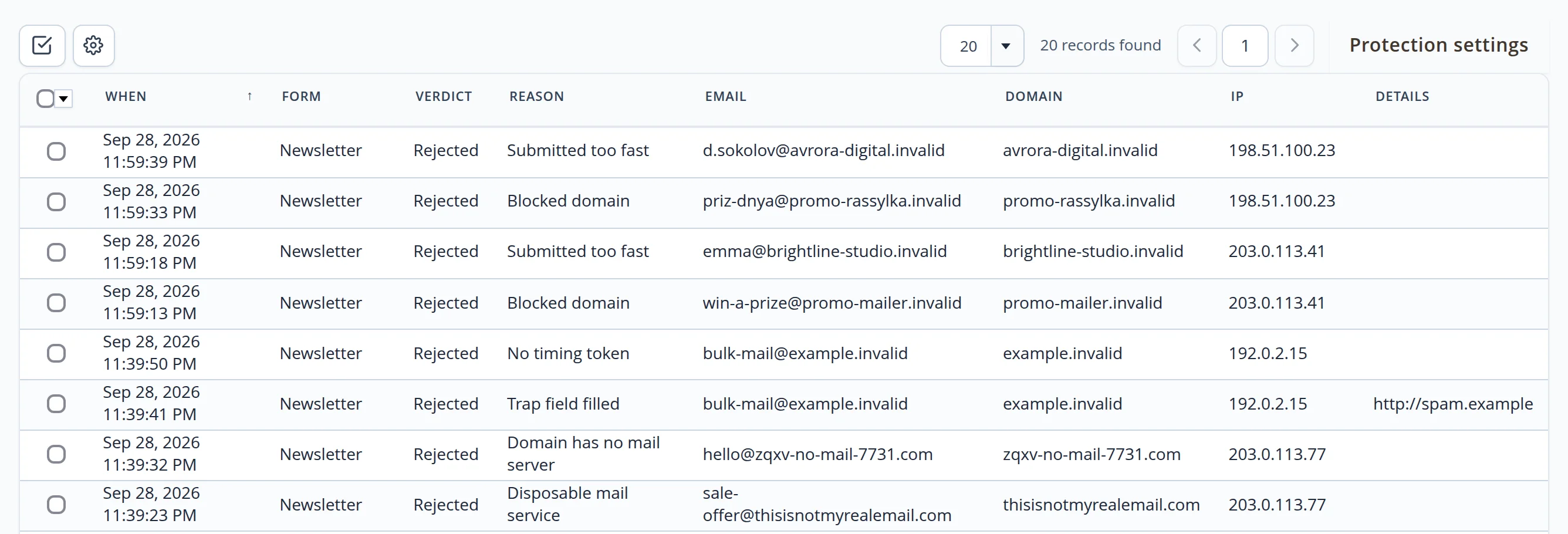
Every submission of every form is a row in the journal: when, which form, what verdict and why. Filter by form, verdict, reason and domain.
Decisions in two clicks
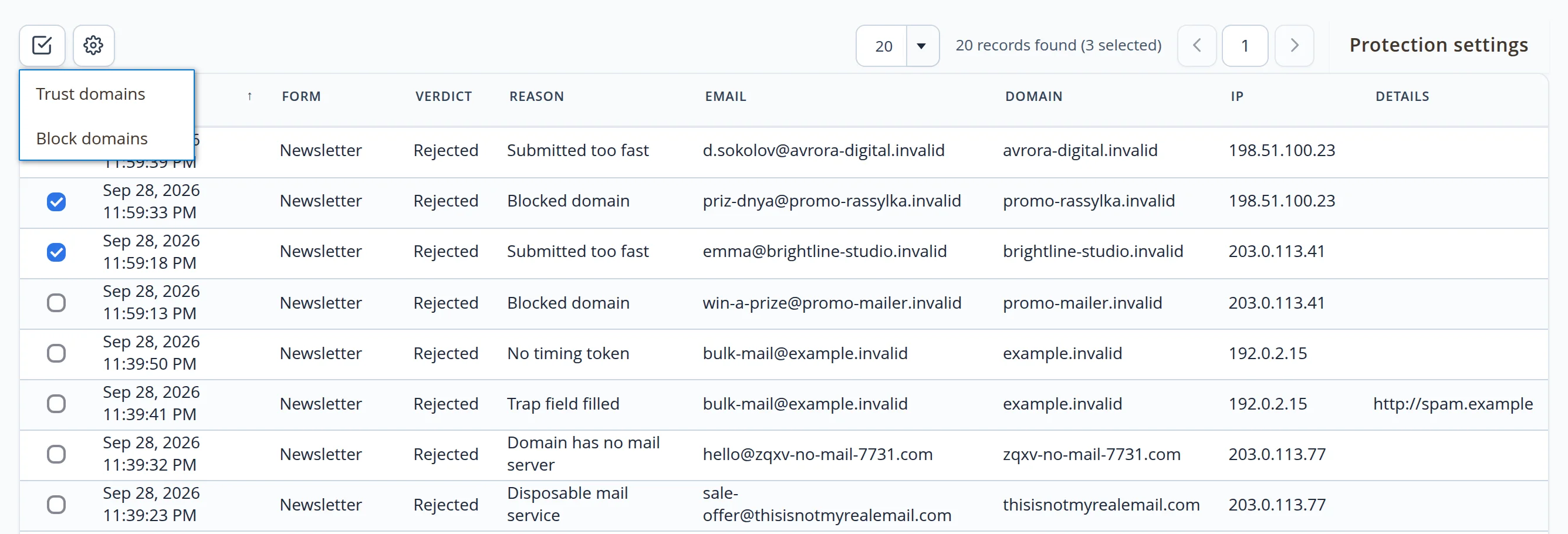
- Trust a domain. partners and your own domain skip the email checks
- Block a domain. every form on the site rejects addresses from it
- Reasons in plain words. “Trap field filled”, “Submitted too fast”, “Blocked domain”
- No manual clean-up. a rejected submission creates nothing — there is nothing to delete
As strict as your business needs
Every threshold is changed in the admin panel without a developer: how many seconds to wait, how many submissions to allow, which domains to let in and which not.
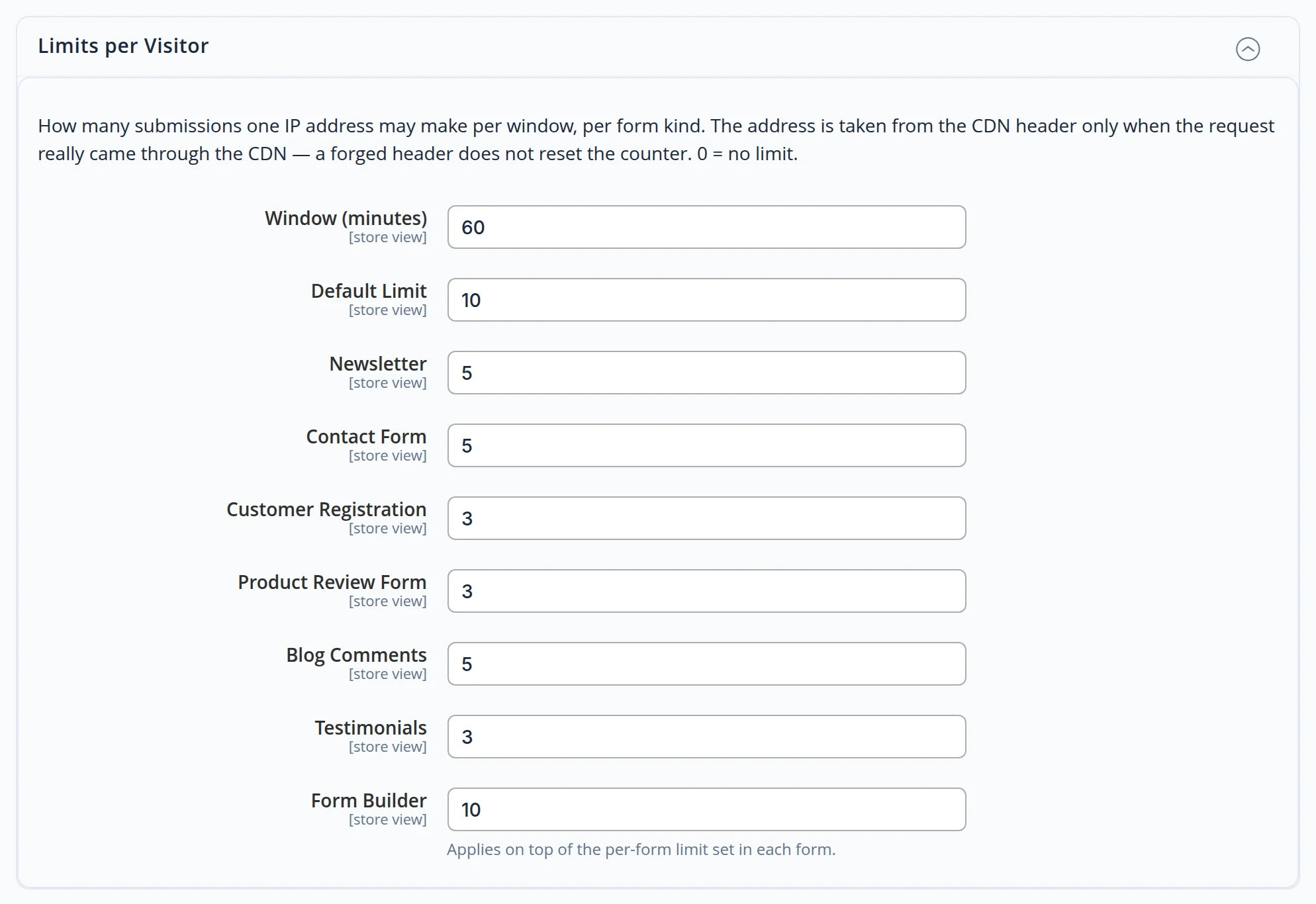
- Limits per form. separately for each of the seven forms — from the newsletter to the form builder
- Domain lists. blocked, trusted, extra throwaway and public mail services
- Burst. hold for review, reject or do nothing; threshold and time window
- Every storefront. settings can be shared or set per language version of the site
Junk does not pile up
Email confirmation
Registration and newsletter sign-ups are confirmed by email: an address nobody clicked through never becomes a customer.
Clean-up every night
Unconfirmed guest sign-ups older than 7 days are removed on their own — the mailing list stays alive.
A journal that does not bloat
Entries older than 90 days are removed automatically; the period is set in the settings.
Protection you neither see nor hear
No third-party services
The checks run on the site itself: visitor data does not go to outside captcha services, and their scripts are not loaded.
The page stays fast
The guard adds a tiny script to the page; the time stamp is requested only while the form is being filled in.
All forms — one guard
Newsletter, contacts, registration, reviews, blog comments, testimonials and the form builder — one set of email rules and one journal.
Let your forms bring customers, not spam
We will set up form protection on your site: thresholds for your flow of requests, domain lists and a decision journal. Need a whole website? See our development service.
