Shoppers look at the product up close — without leaving the product page
In a shop people pick a product up and look at the stitching, the texture, the small print. Online they cannot: if the photo is hard to make out, the shopper leaves to find better pictures — often on someone else’s site.
Here the product photo zooms right where it is: one click and every detail shows, the mouse moves across the shot, another click and the whole photo is back.

For stores where people buy from the photo
Clothing, jewellery, furniture, electronics, packaging with small print — wherever a shopper wants a close look before paying.
Store owner
Fewer exits to “find a better photo” — everything is visible on the product page, next to the buy button.
Content manager
Nothing extra to prepare: the zoom uses the product photo already uploaded, at full size.
Shopper
One click to examine a detail; one more — or just moving the mouse away — to see the whole shot again.
One click — and every detail shows
Over the product photo the cursor turns into a magnifier. A click switches zoom on: the photo grows 2.5 times and the visible part follows the mouse, so the shopper can go over the whole shot. A second click, or moving the mouse off the photo, brings back the full view.

When the whole shot needs to be seen
A button in the corner of the photo opens it full screen — large and free of the page around it. Close it with the cross.

Four settings — and you are done
Zoom works on every product page at once, no special photos needed. The admin holds only what the owner should decide.
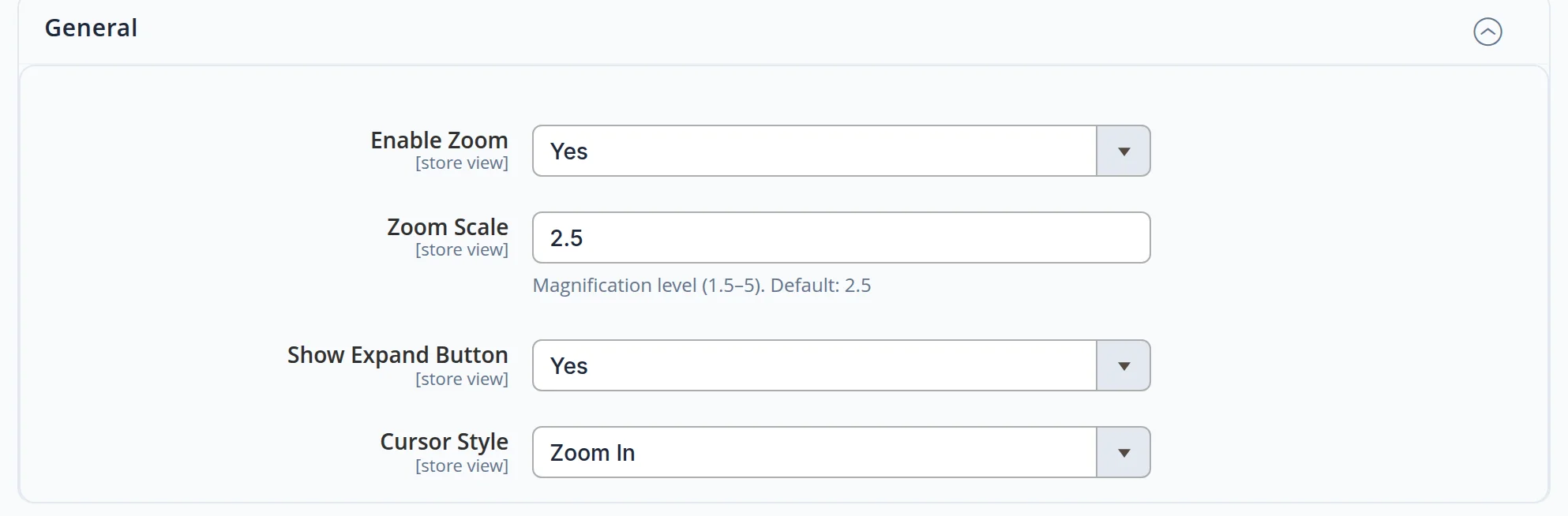
- On or off. for the whole site or a single version
- Scale. from 1.5× to 5×; 2.5× by default
- Full-screen button. whether to show it in the corner of the photo
- Cursor style. magnifier, crosshair or hand
The numbers come from this site, not from a slide
- We clicked a product photo on a desktop in the English and the Russian version: 2.5× zoom switched on and the visible part followed the mouse.
- A second click and moving the mouse away brought back the full view; the corner button opened the shot full screen.
- On a phone the magnifier is off by itself: tapping the photo does not switch it on, and the page shows no errors.
Let shoppers examine the product on your site, not next door
We will set up your product pages: photo zoom, full-screen view and a gallery that works on desktop and phone. Launching a store from scratch? See our online store development service.
Another case: Buy Together — a bundle discount in the cart →
